Bookee reviews: what to check about Kenko now
Older Bookee reviews and today's Kenko website can describe different packages and buying decisions. This guide separates verified current positioning from the questions a studio should resolve in a demo. We are not claiming a fresh survey of customer sentiment.
Published by Junocal, one of the products discussed. This is a source-based comparison, not an independent hands-on review or a paid ranking.
Junocal is $15, $29 or $69 a month
14 days free, no card.
The same numbers in pounds and euros, with no annual contract and no Junocal transaction fee on paid plans. Moving from Bookee? We move your clients and memberships for you, free in your first 30 days.
 5 out of 5 stars on G2
Join 100+ studios and instructors using Junocal
 Behind the Choreo with Natalie
 Sky & Stone
 Kina
 Mirage Dance School
 Flex and Flow Pole Studio
Rated 5 out of 5
The team at Junocal is top notch!
“The team at Junocal has made this so easy. … Also, my clients appreciate how easy it is to navigate the portal and how streamlined everything is. 10 outta 10!”

Rated 5 out of 5
Quick response
“Quick response, flexibility and willing to help with all needs. Junocal has helped me create the guest booking site the way I envision without having to be narrowed into specific limitations all at an affordable rate. I’m so glad to be partnered with Junocal for my booking needs.”

Rated 5 out of 5
Junocal is quick to respond to any questions
“Junocal is quick to respond to any questions and is always making improvements and tweaks to make the experience user friendly for both clients and team members.”

First establish what you are buying
Kenko's current homepage leads with done-for-you marketing for boutique fitness businesses. It describes local SEO, Google Business Profile work, reputation, lead follow-up, booking and member experience. Those are broader responsibilities than a booking-software subscription.
Our buying advice: separate the software licence, managed services, advertising spend and setup work in the proposal. A service can be valuable without being comparable to Junocal's subscription. Conversely, an operator who only needs a class calendar should not have to infer its price from an unrelated marketing package.
How to read Bookee and Kenko reviews usefully
- Date: does the review describe the current product, an older Bookee account or a later service bundle?
- Business: compare the reviewer's class format, team size and country with your own.
- Specific task: “easy to use” is less useful than an explanation of refunds, recurring billing or staff access.
- Context: distinguish vendor-selected testimonials, incentivised reviews and independently submitted feedback.
- Repeatability: turn a reported strength or complaint into a test for your demo. Do not treat one anecdote as a universal product limitation.
A score is useful only with its source, date, sample size and product context. Check those details before treating a review summary as evidence about the package you are buying.
Ask for a proposal you can reconcile
- What is the recurring software price in my currency, and which locations and users does it cover?
- Which marketing work is delivered by people, how often, and who approves changes?
- Are ad spend, messaging, the website, app and onboarding inside or outside the quoted fee?
- Who owns the domain, ad accounts, creative files and customer exports if I leave?
- What are the renewal, cancellation, data-export and payment-processing terms?
Use the cost calculator for the software and fee portion. Keep managed-service costs in a separate line so a lower software price does not masquerade as the same total service.
Test the operation, not a generic demo
For a reformer business, request a demonstration of equipment selection if you need it; do not infer that a feature is absent from a short product page. For a term-based studio, test one full-course purchase, attendance, a missed session and a cancellation. For every studio, test mobile checkout, an exhausted class pack, a failed payment and a refund.
Have the vendor identify the plan used in the demo. Record each step as included, add-on, manual workaround or unavailable, and obtain written confirmation of the important gaps.
Where Junocal belongs on the shortlist
Junocal is an affordable booking-and-operations option for studios that manage their own growth. Starter covers one location and up to five instructor seats; larger tiers expand staff and location limits. The subscription does not include an agency running SEO or advertising for the studio.
See the Pilates booking workflow or adult dance studio software. If you switch, reconcile exports, balances and payment permissions first; the migration checklist explains the control process without promising automatic transfers.
Questions before you choose
What happened to Bookee?
The former Bookee pricing URL now redirects to Kenko. Start your evaluation with the current Kenko product and proposal, and check the date and product scope behind older Bookee reviews.
Is Kenko just booking software?
Its current website foregrounds managed marketing for boutique studios, including local visibility, lead follow-up and booking. Ask which software and services your proposed package actually includes.
Does a high review rating prove it fits my studio?
No. Read recent reviews from businesses like yours, check which package they used, and reproduce your own booking and payment workflow. A rating for a managed service does not prove a specific booking feature works.
When is Junocal an alternative?
Shortlist Junocal when your main need is affordable self-managed class booking, packs, memberships and a branded booking page. It is not a like-for-like substitute for a done-for-you marketing service. Compare that service separately if you need it.
What your clients see on Junocal
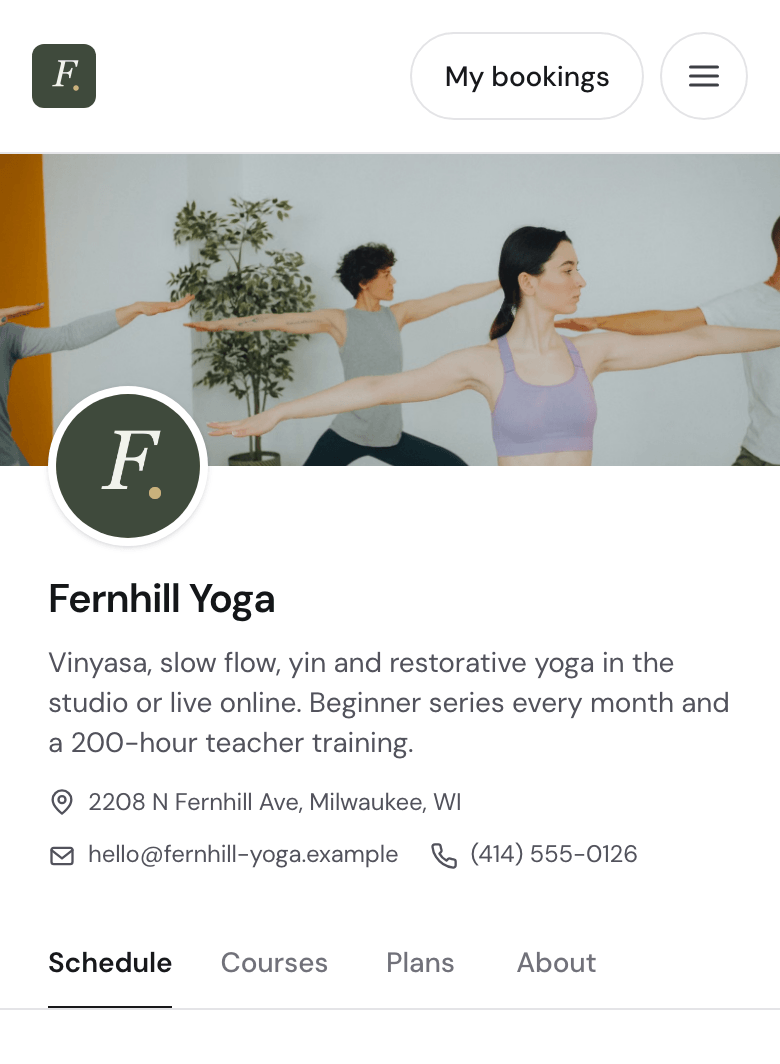
A yoga studio's booking page, on a phone. Yours carries your own name and classes.
Your own booking page
Clients book and pay on a page with your name, photos and colours.
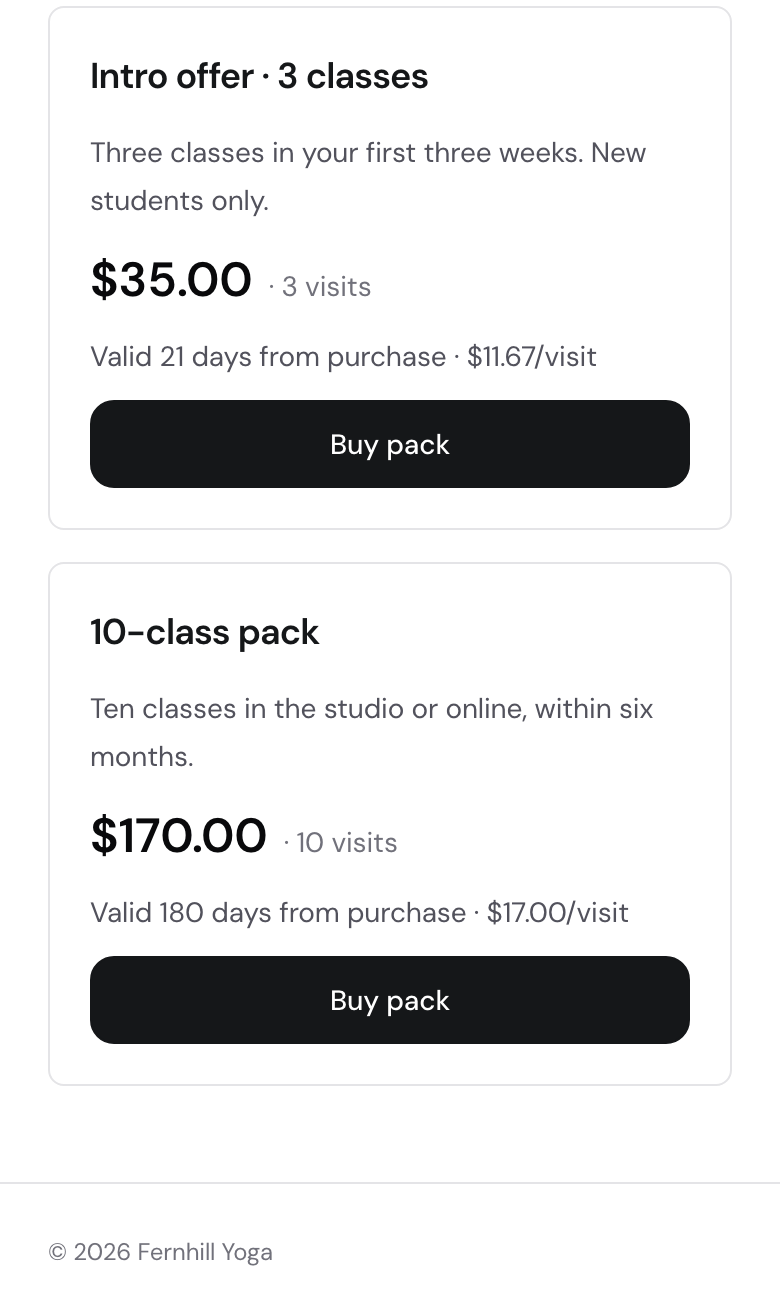
Packs, memberships and intro offers
Sell them from the same page. Credits come off at each booking.
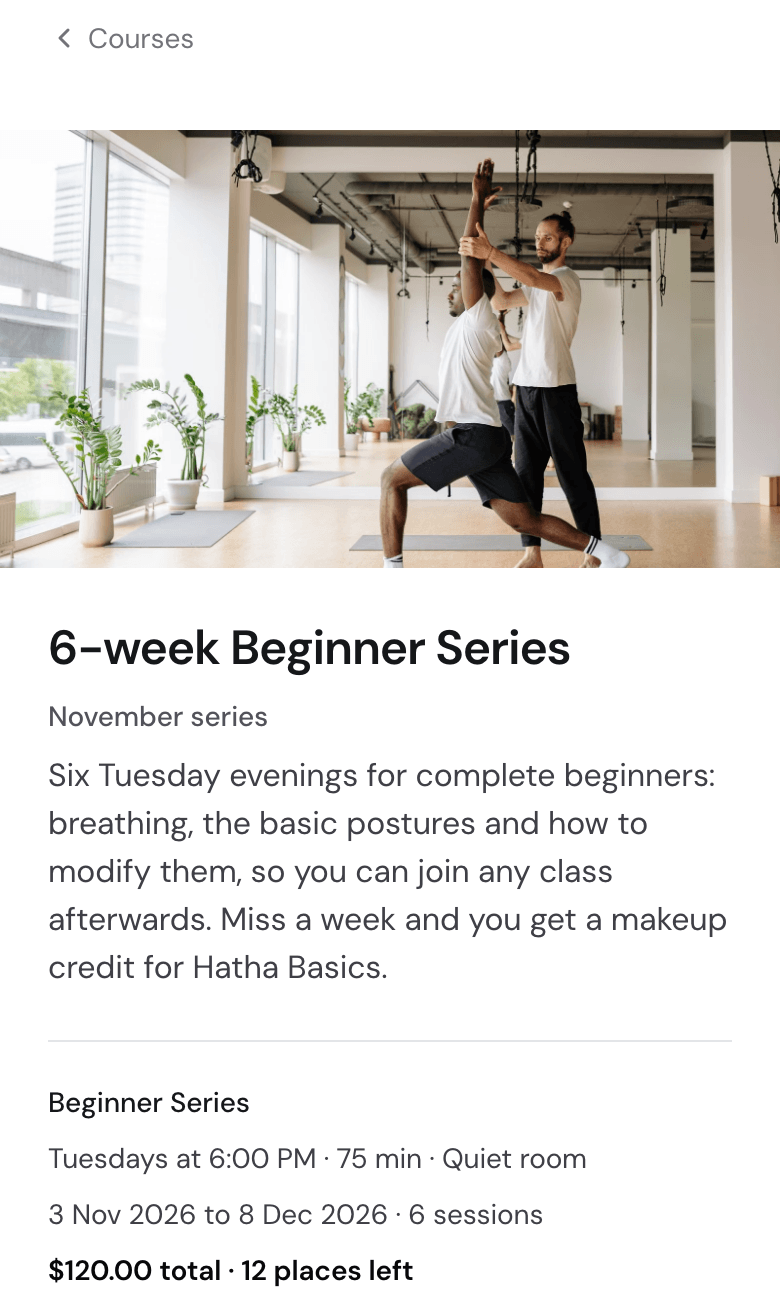
Courses with one sign-up
Sell a six-week series as one course. Clients sign up and pay once.
14 days free, no card.
Free in your first 30 days
We move you over from Bookee
Send us your Bookee export and we do the rest.
- Clients, with their profiles and contact details
- Booking history, with who attended
- Active memberships, with their current period
- Class packs, with the credits left
- Email opt-in status
Saved cards do not come across in an export. We plan any change to recurring billing with you before you switch. See how a move works.
Everything included for studios and instructors
One account covers booking, payments, client care and reporting. Every plan includes the features without a plan label.
Scheduling and booking
Classes and timetables
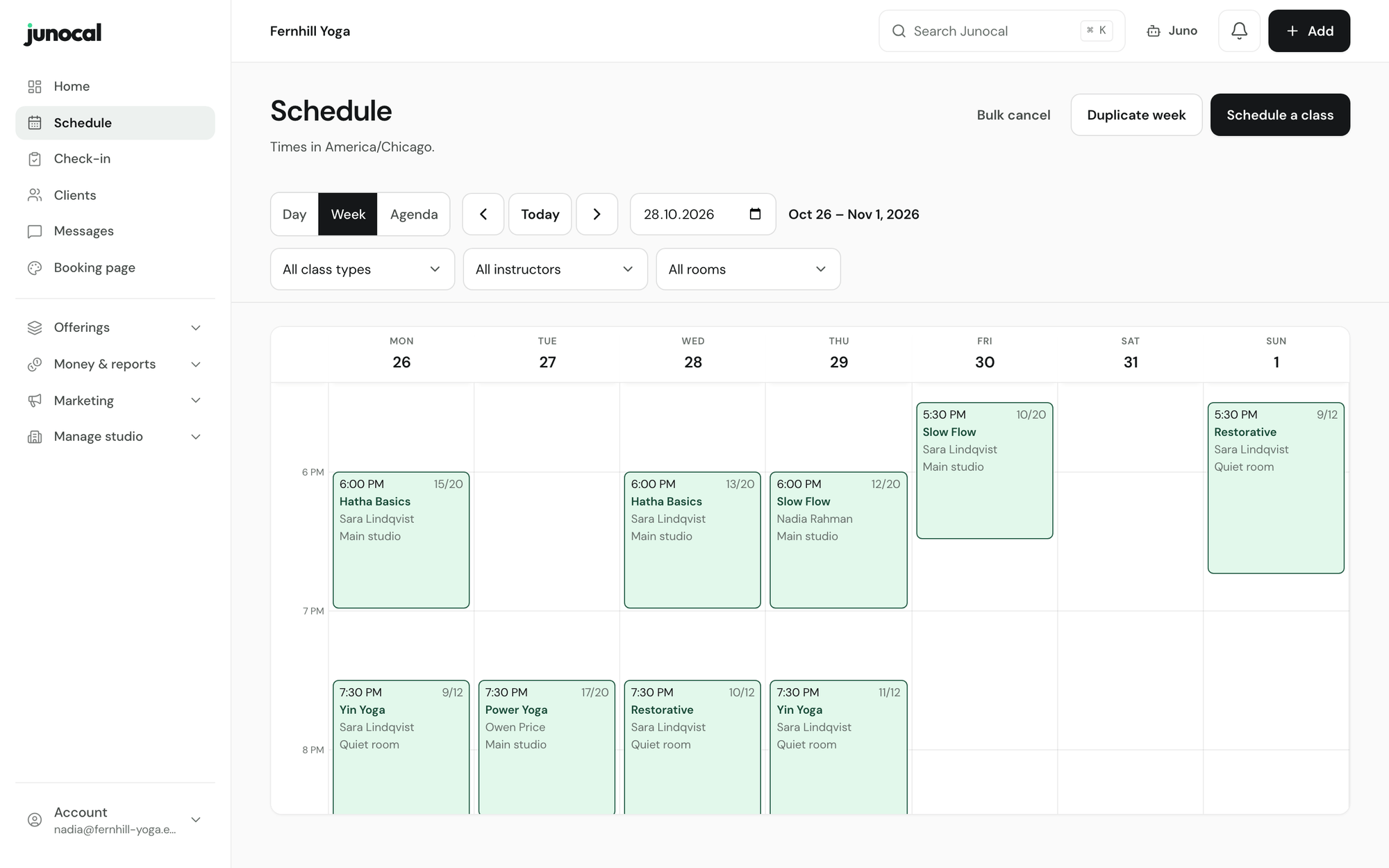
Recurring classes and one-off workshops on one calendar, with capacity set once.
Sell a dated series as one enrolment, with its own price, capacity and attendance.
Clients book 1:1 time from the hours you set, with buffers, deposits and optional weekly visits.
Clients choose a named place in your room layout. Take broken equipment out of use.
Separate in-person and online capacity, with meeting links sent automatically.
Book clients with a pack or membership the moment a place opens, or let the first to claim take it.
Class prerequisites
Open a level only to clients with enough recorded attendance or instructor approval.
Family and group bookings
One account can book for children, partners or friends, and pay for a guest by card or from a pack.
Studio hire and parties
Rent out rooms and equipment or quote party packages, with deposits and availability checked against your timetable.
Selling and payments
Drop-in prices
New clients can book and pay for a single class without buying credits first.
Packs, memberships and intro offersFrom Starter
Credits that deduct themselves, higher credit costs for some classes, one-time intro passes, and memberships clients can pause or upgrade.
Gift cards
Sell gift cards in your own design, online or at the desk. Clients can pay with them when they book online.
Coupons and promo codes
Discount a class, pack or membership for a campaign, partner or birthday.
Referral codes
Clients share a code with friends, and you see who brought each new client.
Payments to your own Stripe
Money goes straight to your Stripe account. Paid plans add no Junocal transaction fee.
Failed-payment recovery
When a renewal fails, the client gets a secure link to update their card.
Clients and communication
Branded booking page
Your logo, colours and photos on one link. Add it to your WordPress, Wix or Squarespace site too.
Collect intake forms, signatures and photos during booking or before the visit.
Private notes on each profile, shared only with the teammates you choose.
Confirmations, reminders a day, 2 hours and 30 minutes before, plus welcome, win-back and renewal emails.
Ask for a review after class, then choose which ones appear on your booking page.
Email broadcastsFrom Studio
Announce a new class, workshop or timetable change to opted-in clients.
Shared client inboxFrom Studio
Client email replies land in one inbox your whole team can answer.
Client follow-up listsFrom Studio
See who came once, who signed up but never booked and whose pack is low, then message them.
Running the business
Check in the whole day from one desk screen, or from the instructor's day-of roster on a phone.
Run the day, check clients in and take desk payments from the Junocal app. Clients book and manage visits in it too. Android is coming soon.
Staff and cover
Five instructor seats on Starter, unlimited from Studio, plus front-desk roles and substitute cover.
Reports
Sales and attendance on every plan. Business, class and instructor performance from Studio.
Multiple locationsFrom Studio
Up to five locations on Studio and ten on Growth, with memberships that work across sites.
The WordPress plugin, the Wix app, calendar feeds and Zoom on every plan. Mailchimp and Klaviyo from Studio.
Juno AI assistantFrom Studio
Ask about bookings or clients. Juno drafts the change and you approve it.
CSV export
Download clients, bookings and revenue whenever you like.
Primary pages, checked by hand
We checked the linked vendor pages on 7 September 2026. Prices retain their stated currency and billing period; quote-only terms are not treated as published prices. Suggested demo tests and worked examples are our analysis, not claimed customer outcomes. Confirm the exact plan and signed terms before buying.
Last reviewed .
Try your own weekly workflow
Junocal starts at $15/month on monthly billing, with no Junocal transaction percentage. Payment processing is separate. Check the plan limits and pricing, then test your classes before committing.
5 out of 5 stars on G2
Join 100+ studios and instructors using Junocal