






junocal for iphone

Your studio and your clients, in one app

Check clients in at the door, see who's booked and take payments from your iPhone. Your clients use the same app to book, manage their visits and keep track of their packs and memberships. Free on every plan.

Download Junocal on the App StoreComing soon to Google Play

For iPhone and iPad with iOS 16.4 or later. Until the Android app is ready, Android users open Junocal in their phone's browser.

5 out of 5 stars on G2

Join 100+ studios and instructors using Junocal

  • Behind the Choreo with Natalie
  • Sky & Stone
  • Kina
  • Mirage Dance School
  • Flex and Flow Pole Studio

Rated 5 out of 5

The team at Junocal is top notch!

“The team at Junocal has made this so easy. … Also, my clients appreciate how easy it is to navigate the portal and how streamlined everything is. 10 outta 10!”

Terry, Tumble And Stunt5-star review on Trustpilot

For you and your team
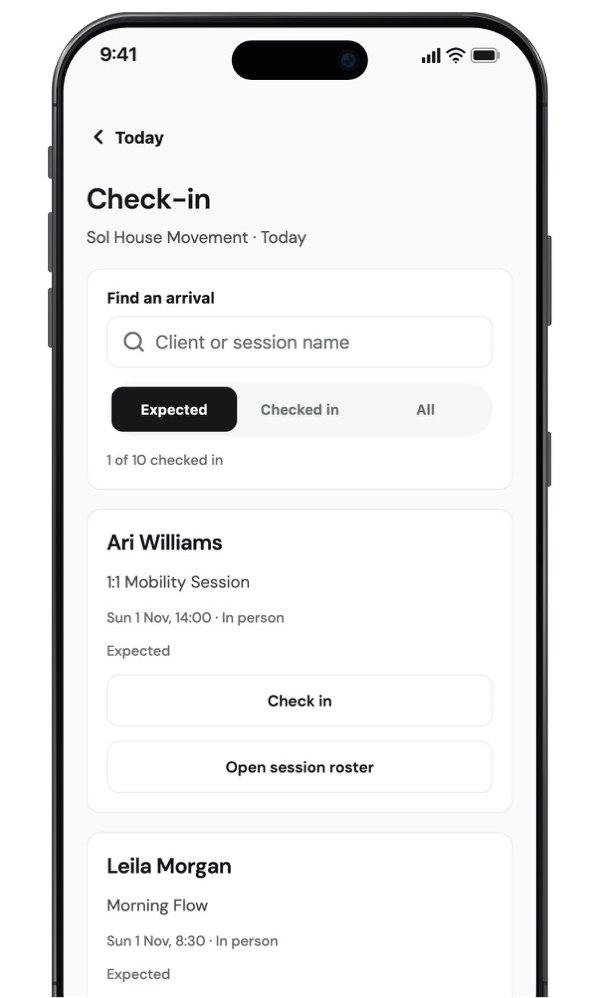
The Junocal app's Check-in screen for today, with a search box, Expected and Checked in filters and a Check in button for each client.
  • See today’s classes and appointments, then jump to any date.
  • Open a roster and check clients in, with undo for a wrong tap.
  • Add classes, appointments and new clients.
  • Record a sale or desk payment, or show a QR code so the client pays on their own phone.
  • Find a client’s details and message everyone booked into a class.
  • Switch between studios. Each person sees what their role allows.
For your clients

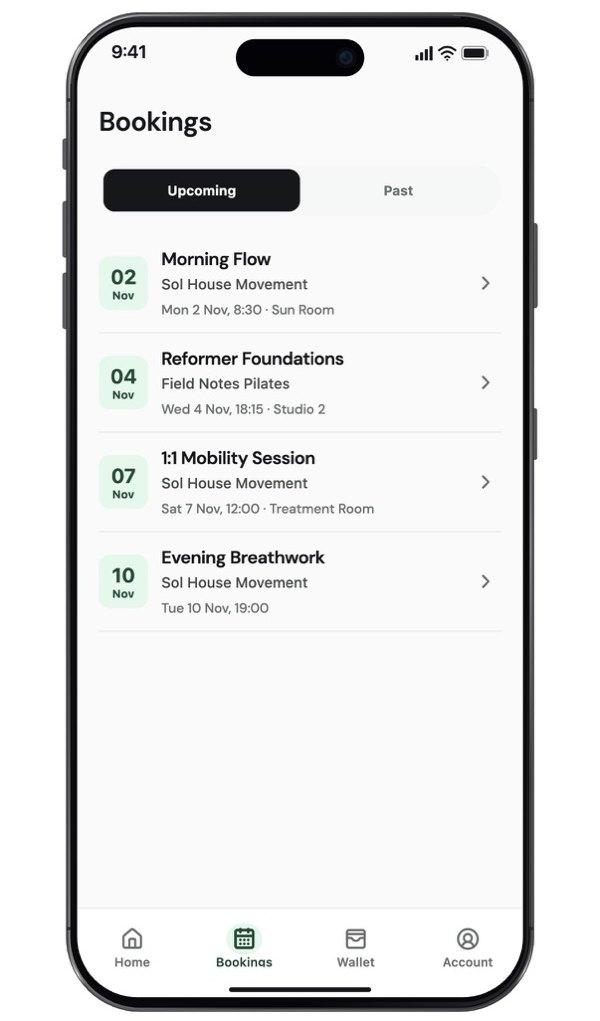
A client's upcoming bookings in the Junocal app, listing four classes and appointments with their dates, times and rooms.
  • Browse your classes, appointments and courses, and book a visit.
  • Join a waitlist and keep every upcoming booking in one list.
  • Cancel or reschedule when your policy allows it.
  • Complete your forms and find their receipts.
  • See pack and membership balances and renewal dates.
  • Pause a membership or change plan, when you allow it.
the things buyers ask

Questions

How much does the Junocal app cost?

Nothing. The app is free to download and included on every Junocal plan, including Free. When clients pay in the app, the money goes to your own Stripe account, the same as on your booking page.

Is there an Android app?

It’s coming soon to Google Play. Until then, everyone on Android uses Junocal in their phone’s browser: your team opens the day-of staff view, and clients use your booking page and the links in their emails.

How do my clients find my studio in the app?

Clients sign in with the email address your studio has for them, and your studio appears in the app with its schedule and their bookings. The app has no public directory of studios, so your clients only see studios they already use.

How does my team get into the app?

Invite each person from Team as usual. Once they’ve accepted, they download the app, sign in with the email address you invited and choose Studio tools. Owners, admins, front desk and instructors each see what their role allows.

Do clients need the app to book?

No. Your booking page works in any browser, so new clients can book and pay without downloading anything. The app is for regulars who want their bookings, packs and memberships in one place.

Is the app published under my studio’s name?

No. It’s one Junocal app. Inside it, clients see your studio’s classes, prices, credits and booking rules, the same as on your booking page.

Setup guides